Rich Results Test: A Practical Debugging Walkthrough
Paste a URL into Google's Rich Results Test, wait a few seconds, and you get a verdict along the lines of "1 valid item detected" with a small pile of warnings under it. Most people read the green check and close the tab. The verdict answers a narrower question than it appears to, and the distance between "valid item detected" and "stars showing in search" is where schema debugging time actually goes.
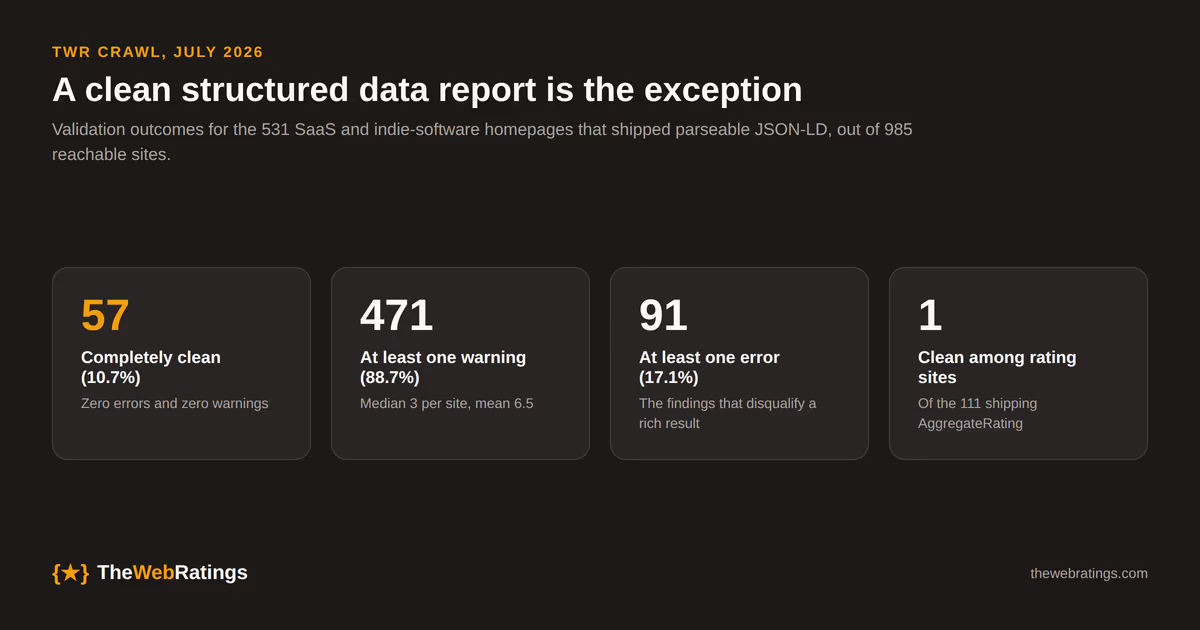
We crawled 985 reachable SaaS and indie-software homepages in July 2026 and validated every JSON-LD block with our own parser. The full dataset is published at /research/saas-review-schema-2026. Of the 531 sites shipping parseable JSON-LD, 57 validated with zero errors and zero warnings, or 10.7%. If your test comes back with a handful of warnings you are in the normal 89%, and the useful skill is knowing which of them costs you anything. This walkthrough covers how to read the output, the four failure modes the tool will not report at all, and the order I work through them. The wider map of which schema types are worth shipping lives in our structured data guide.
What the test actually answers
The Rich Results Test checks whether a page carries structured data that makes it eligible for a Google Search rich result, and whether the properties that feature requires are present. It is scoped to Google features. Mark up a schema.org type that Google has built no search feature on top of and the tool returns nothing for it, while the markup itself is perfectly correct.
Two limits are worth internalizing before you debug anything.
The first is Google's own hedge, printed on the result page: "Google does not guarantee that your page will appear exactly as shown here, or that any of the views shown will be applied to your page result." Eligibility is the ceiling the tool measures. Everything after that (quality, ranking, policy) is decided elsewhere and reported nowhere in this UI.
The second is that the supported list moves under you. Google removed FAQ support from the Rich Results Test in June 2026, a month after FAQ rich results stopped appearing in Search on May 7, 2026, with Search Console API support ending in August 2026. A page that returned a clean FAQ result last year now returns nothing for that type with byte-identical markup. That is a tool change, not a regression in your code. We covered what the deprecation means for the three most common types in which rich results are worth it.
Test the live URL, not a pasted snippet
The tool takes either a URL or a code snippet, and the two modes fail differently. Google recommends the URL input, because the code input runs into JavaScript limitations including CORS restrictions. The URL test fetches and renders the page the way Googlebot would, using the evergreen Chromium renderer that Google's testing tools moved to in 2019, so schema injected by client-side JavaScript shows up. Paste that same page's server-rendered source into the code box and the injected block is missing, which looks exactly like a schema bug and is not one.
The URL test has its own precondition: every page resource must be reachable by an anonymous user from the public internet. Anything behind a firewall, a password, or a staging basic-auth prompt is invisible to the test. Google's structured data guidelines put it plainly: do not block your structured data pages to Googlebot using robots.txt, noindex, or any other access control method. A crawl failure in the tool is usually an access problem rather than a markup problem, and it is worth reading the crawl status line (it names the user agent used, smartphone or desktop) before touching any JSON.
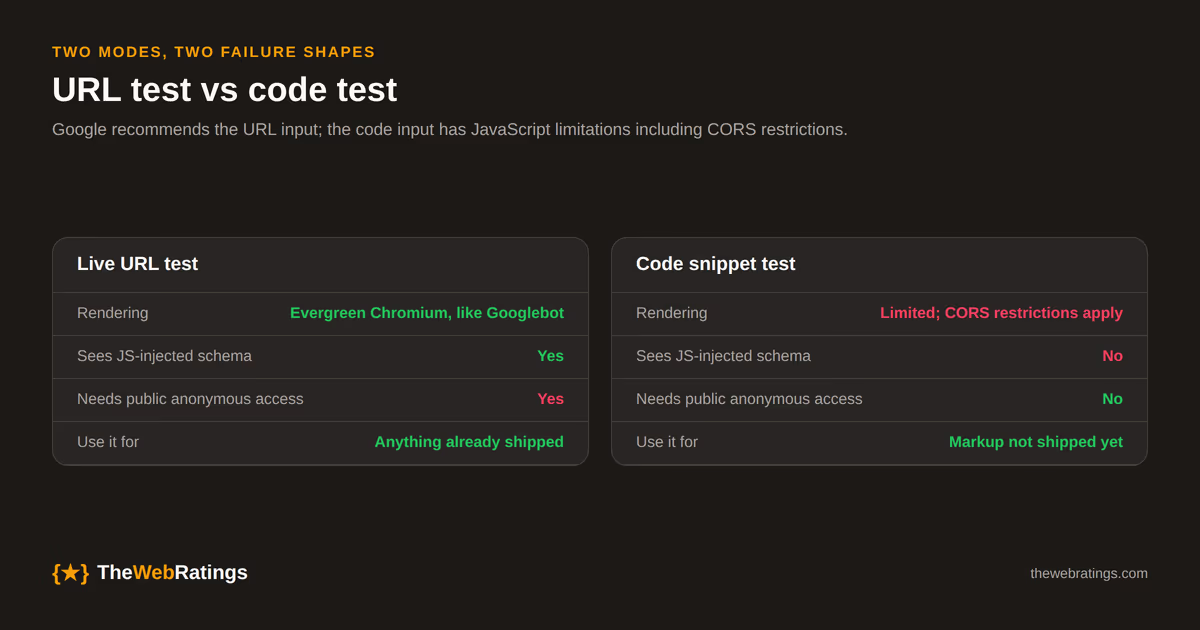
Practical consequence: when a page tests clean in code mode and empty in URL mode, the problem is access or rendering. When it tests clean in URL mode and you still see nothing in search weeks later, the problem is eligibility, which is the section further down.
Warnings are the normal state, and errors are rarer than you would guess
In our crawl, 91 of the 531 JSON-LD sites (17.1%) carried at least one outright error. Warnings were near-universal: 471 sites (88.7%) had at least one, with a median of 3 per site and a mean of 6.5. Only 57 sites were completely clean. Among the 111 sites shipping AggregateRating, exactly one validated with no errors and no warnings.
The distinction matters because the two mean different things about your search results.
An error means a property the feature requires is missing or malformed. That disqualifies the rich result for that item. Missing ratingValue on an AggregateRating, a ListItem with no position, a rating with no parent item to attach to: these are the ones to fix today. The property-by-property version for ratings is in how to add AggregateRating schema.
A warning means a recommended property is absent. The item stays eligible and the rendered result is thinner, or it competes worse against a page that supplied the field. Triage warnings against the feature you actually want rather than clearing them for a tidy green screen. A missing applicationCategory on a SoftwareApplication is worth ten minutes; a missing award is not. Chasing a zero-warning report across 6.5 warnings per page is how teams spend a sprint on structured data and measure nothing.
The four failures the Rich Results Test will not report
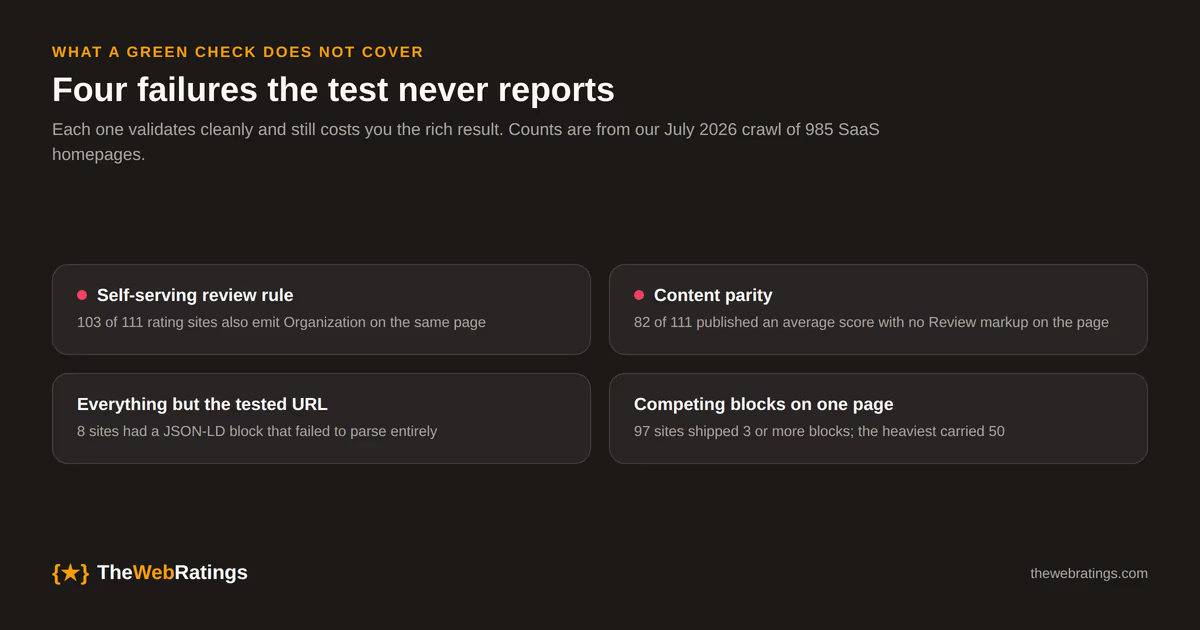
1. Eligibility rules it does not evaluate. This is the big one for anyone marking up reviews. Google's review snippet guidance is that when the entity being reviewed controls the reviews about itself, pages using LocalBusiness or any other Organization type are ineligible for the star feature. The Rich Results Test does not model who controls the reviews. It reports a valid item, and Google renders no star, forever. In our crawl, 103 of the 111 sites carrying AggregateRating also emitted Organization on the same page. That is a lot of teams debugging syntax that was never the problem.
2. Content parity. Google's structured data general guidelines require that you do not mark up content that is not visible to readers of the page. The test parses your JSON-LD; it does not diff that JSON-LD against the rendered text. A page can score a valid AggregateRating while showing the visitor no reviews at all. 82 of the 111 rating sites in our crawl shipped an average score with no Review markup anywhere on the page. Structured data violations can draw a manual action that strips rich result eligibility, separately from normal ranking.
3. Everything outside the one URL you tested. The tool is per-URL and your markup is per-template. Testing one product page tells you about that page and the template as it rendered at that moment. Eight sites in our crawl had at least one JSON-LD block that failed to parse entirely (10 blocks lost across them), which is the kind of breakage a templating change introduces on a subset of pages while the page you happen to test stays fine.
4. Which of several competing blocks Google will believe. 97 of the 531 JSON-LD sites (18.3%) shipped three or more separate blocks, and the heaviest page in the crawl carried 50. The test flattens them into a list of detected items. It will not tell you that two blocks describe the same product with different ratings, or that nothing connects them because no @id values are wired together. Google picks; you find out later.
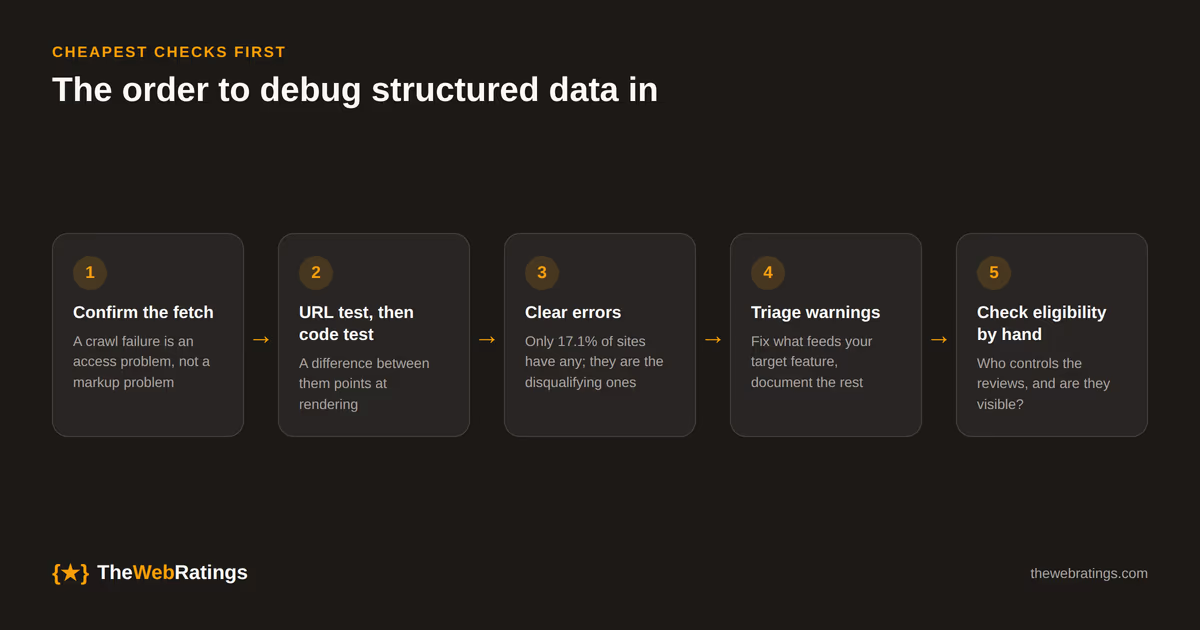
The order I work through it
- Confirm the fetch. If the tool reports a crawl failure, stop looking at JSON. Check anonymous access, robots.txt, and whether the URL redirects somewhere unexpected.
- Run the URL test, then the code test. Items present in code and absent from URL means access or rendering. Items present in both means your markup is reaching Google and you can start reading it.
- Clear errors first. They are the only findings that definitively cost you the feature, and at 17.1% of sites they are the minority of findings.
- Triage warnings against the target feature. Fix the recommended properties that feed the result you want; leave the rest documented and unfixed.
- Check eligibility and content parity by hand. Ask who controls the reviews, which node the rating hangs on, and whether a visitor can see the reviewed content on that page. The tool answers none of these.
- Verify in Search Console a week later. The Rich Results Test is a live render of the page right now. The enhancement reports show what Google actually indexed across the site, which is the number that matters.
Which testing tool answers which question
No single tool covers the whole surface, and reaching for the wrong one is why the same question gets asked three times. We build the third row, so weigh that accordingly.
| Tool | The question it answers | Reach for it when |
|---|---|---|
| Google Rich Results Test | Is this page eligible for a Google rich result, and are the required properties present? | You want Google's own verdict on a live URL, rendered the way Googlebot renders it |
| Schema Markup Validator (validator.schema.org) | Is this valid schema.org, independent of Google features? | You are marking up types Google has no rich result for, or you need to see the full parsed graph |
| Our JSON-LD validator | What errors and warnings does this block carry against Google's requirements? | You are iterating on markup before it ships, or checking a block that lives on a page you cannot expose publicly |
| Search Console enhancement reports | What did Google actually index, sitewide, over time? | You need to know whether a fix took effect, or which templates are broken at scale |
The first three answer questions about a page. The fourth answers questions about your site, and it is the only one with a time axis, which makes it the one to check after you ship a fix rather than the one to open first.
For a worked example of markup that clears all four, our public app profiles at /apps carry SoftwareApplication with ratings attached to the product node and the underlying verified reviews rendered on the same page. The eligibility argument there rests on the reviews coming from users rather than from the vendor, which is the structural difference the Rich Results Test cannot see and Google's guidelines care most about.
Frequently asked questions
No. Google states directly on the result page that it does not guarantee your page will appear exactly as shown, or that any of the shown views will be applied to your result. The test measures eligibility, which is a ceiling rather than a promise. Ranking, content quality, and policy decisions all happen after eligibility and are not reported by the tool.
The most common cause is the self-serving review rule, which the test does not evaluate. Google considers pages ineligible for the star review feature when the entity being reviewed controls the reviews about itself, including reviews delivered through an embedded third-party widget. In our July 2026 crawl, 103 of the 111 SaaS homepages carrying AggregateRating also emitted Organization markup on the same page, which is exactly the shape that fails this rule while validating cleanly.
Test the live URL whenever the page is publicly reachable. Google recommends the URL input because the code input has JavaScript limitations including CORS restrictions, and the URL test renders the page the way Googlebot does, so schema injected by client-side JavaScript is included. Use the code input for markup that has not shipped yet or lives behind authentication, and remember that a difference between the two modes is itself a useful signal about rendering.
No, and trying to is a poor use of time. Warnings mean a recommended property is missing, so the item stays eligible while the rendered result may be thinner. Across the 531 SaaS homepages shipping JSON-LD in our crawl, the median site carried three warnings and the mean was 6.5, with only 57 sites completely clean. Fix the recommended properties that feed the specific rich result you want and leave the rest.
Google removed FAQ support from the Rich Results Test in June 2026, after FAQ rich results stopped appearing in Google Search on May 7, 2026. Search Console API support for the type ends in August 2026. Your FAQPage markup is still valid schema.org and Google says leaving it in place causes no problems, but there is no rich result to test for and no report to check.
It fails the fetch rather than the validation. Every page resource has to be reachable by an anonymous user from the public internet, so anything behind a firewall, password, or staging authentication is invisible to the test. Google's structured data guidelines also say not to block structured data pages to Googlebot with robots.txt, noindex, or other access controls, so a fetch failure in the tool often signals a real indexing problem rather than a testing inconvenience.